Centos Wp

When the financial budget or human resources are limited, WordPress is still the best choice to quickly build a blog or corporate website.

Recently, I used WordPress while learning to build a simple official website for a brother company. The code is debugged locally. Today I learned how to publish this program on the server.

Note: The server is a cloud host on Tencent, and the operating system is CentOS 6.8 64-bit.
NVM for Windows

Introduction

nvm-windows is a Node.js version manager written in Go for Windows. GitHub repository

Download and Install

Download from releases

Common Commands

  1. Install a specific Node.js version:

nvm install

Example:

nvm install 6.2.0

You should see output indicating Node.js 6.2.0 and the matching npm version are being downloaded and installed.

Downloading node.js version 6.2.0 (64-bit)… Complete Creating C:\Users\Administrator\AppData\Roaming\nvm\temp

Downloading npm version 3.8.9… Complete Installing npm v3.8.9… Installation complete. If you want to use this version, type nvm use 6.2.0

TypeScript Introduction

1. Introduction

TypeScript is a Microsoft language released in 2012. It is a superset of JavaScript, compiles to JavaScript, and adds optional static typing plus class-based object-oriented capabilities.

TypeScript files have the extension .ts.

TypeScript cannot run directly in the browser environment. It needs to be compiled into JavaScript before running in the browser.

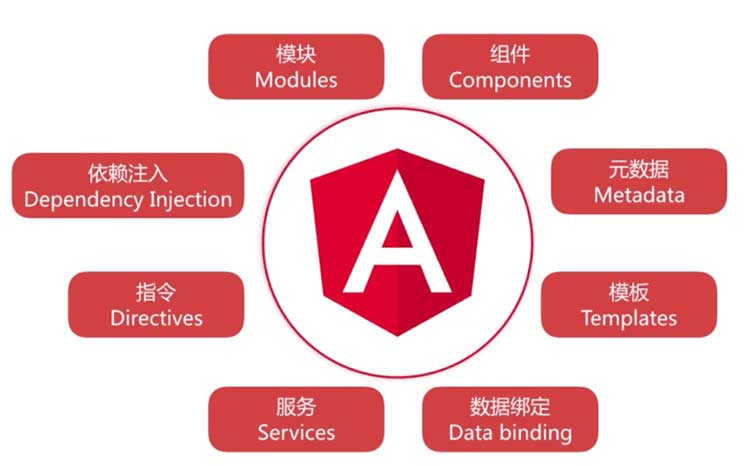
TypeScript is the officially recommended language for Angular 2 development. It can also be used as a development language for projects using frameworks or class libraries such as React, Vue, and ReactNative.

Angular 2 Basics

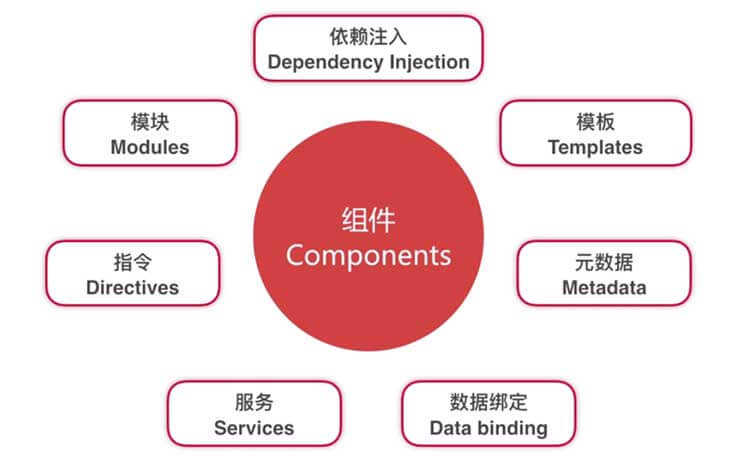
1. Components

1.1 Components and Example Code

// Decorator
@Component({
    // metadata

    selector: 'hello',

    // Define the component's template
    template: '<p>{{greeting}}</p>
})

// Component class
export class HelloComponent {
    private greeting: string;
    constructor() {
        this.greeting = 'Hello, Welcome to Angular 2!';
    }
}

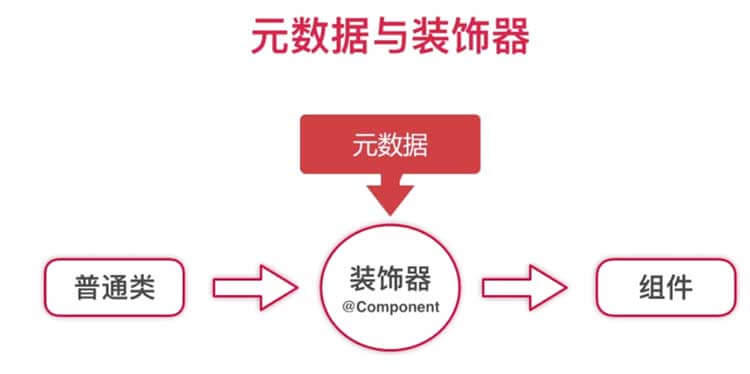
  1. Decorator: @Component

Decorators attach metadata to a class so Angular knows how to treat it as a component.

  1. Metadata

Metadata describes configuration such as the selector, template, and dependencies.

Js Number

1. NaN:

  1. Definition: NaN is a special value in JavaScript, which means “Not a Number”. It mainly occurs when there is an error in parsing a string into a number.

  2. NaN is not an independent data type, but a special value. Its data type still belongs to number, which can be seen clearly using the typeof operator.

typeof NaN // ’number'

  1. NaN is not equal to any value, including itself.

NaN === NaN // false

Ss

In view of the fact that scientific Internet access has become more and more inconvenient recently, many previously strong VPNs have been forced to stop their services, so they have to do it themselves and build a ladder. After searching for information online, I accidentally discovered that Google Cloud Platform has a free trial service (in fact, Amazon Cloud also has a one-year free trial). New users will be given $300 for registration, which is valid for one year and can be used to build a ladder for fun.

Mysql Notes 3

1. Add or delete columns

  1. 1 Add a single column

Syntax: ALTER TABLE tbl_name ADD [COLUMN] col_name col_definition [FIRST | AFTER col_name];

Keywords that specify positional relationships:

  1. FIRST: Indicated in the first column of the data table

  2. AFTER: The parameter col_name is the name of a data column, which means it is specified after the data column.

The sample code is as follows:

ALTER TABLE users ADD age TINYINT UNSIGNED NOT NULL DEFAULT 10;

Use Gitment As Comment For Your Blog

Gitment is a comment system built using GitHub Issues. This article teaches you how to use Gitment as a comment system for your own blog.

Let’s briefly introduce the advantages and disadvantages:

1. Advantages:

Gitment supports direct introduction on the front end without any back-end code. You can log in, view, comment, like and other operations on the page. It also has complete Markdown / GFM and code highlighting support, which is especially suitable for various static blogs or project pages based on GitHub Pages.

Python Mysql

1. Application architecture

Client –> Business logic layer –> Data access layer –> Database

2. Python DB API

Python application (including SQL) –> Python DB API (unified and standardized interface for accessing database MySQLdb) –> MySQL/Oracle/SQLServer and other databases

  1. Database connection object: connection

  2. Database interaction object: cursor

  3. Database exception class: exceptions

3. Access database process:

Create connection object connection –> Get interactive object cursor –> Execute query/execute command/get data/process data, etc. –> Close cursor –> Close connection

Mysql Basic 2

1. Basic data types of MySQL:

1. Numeric type:

Includes strict numeric data types (INTEGER, SMALLINT, DECIMAL, and NUMERIC), as well as approximate numeric data types (FLOAT, REAL, and DOUBLE PRECISION).

typesizerange (signed)range (unsigned)purpose
TINYINT1 byte(-128, 127)(0, 255)small integer value
SMALLINT2 bytes(-2^15, 2^15 -1)(0, 2^16 -1)Large integer value
MEDIUMINT3 bytes(-2^23, 2^23 -1)(0, 2^24 -1)Large integer value
INT or INTEGER4 bytes(-2^31, 2^31 -1)(0, 2^32 -1)Large integer value
BIGINT8 bytes(-2^63, 2^63 -1)(0, 2^64 -1)Very large integer value
FLOAT4 bytes(-3.402 823 466 E+38, -1.175 494 351 E-38), 0, (1.175 494 351 E-38, 3.402 823 466 351 E+38)0, (1.175 494 351 E-38, 3.402 823 466 E+38)Single precision floating point value
DOUBLE8 bytes(-1.797 693 134 862 315 7 E+308, -2.225 073 858 507 201 4 E-308), 0, (2.225 073 858 507 201 4 E-308, 1.797 693 134 862 315 7 E+308)0, (2.225 073 858 507 201 4 E-308, 1.797 693 134 862 315 7 E+308)Double precision floating point value
DECIMALDECIMAL(M,D). If M>D, M+2 otherwise D+2Values ​​attached to M and DValues ​​attached to M and DDecimal value

DECIMAL(M,D):