Angular 2 Basics
Contents
1. Components
1.1 Components and Example Code
// Decorator
@Component({
    // metadata

    selector: 'hello',

    // Define the component's template
    template: '<p>{{greeting}}</p>
})

// Component class
export class HelloComponent {
    private greeting: string;
    constructor() {
        this.greeting = 'Hello, Welcome to Angular 2!';
    }
}
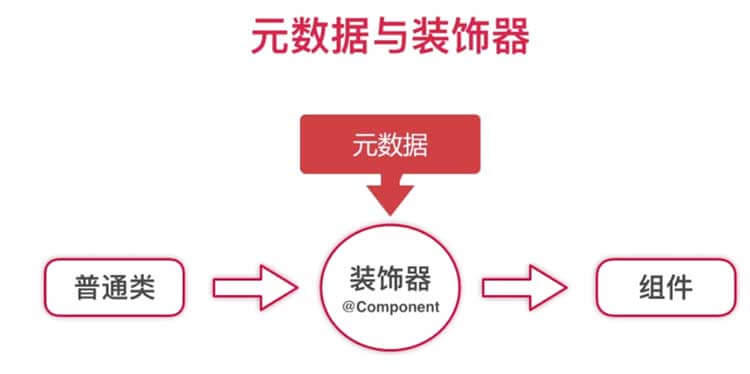
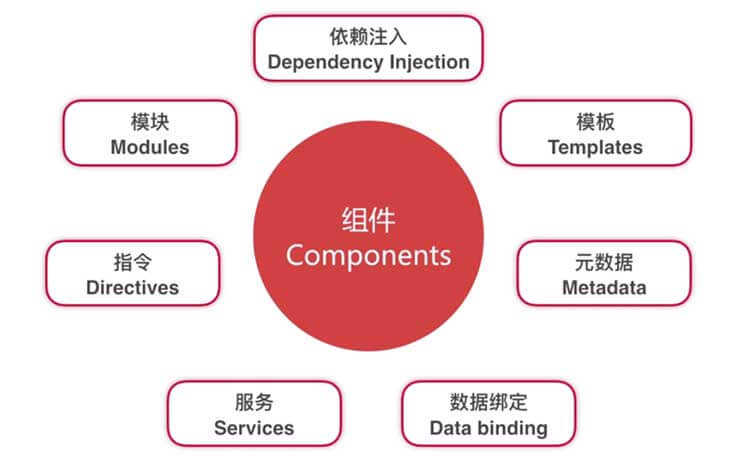
- Decorator:
@Component
Decorators attach metadata to a class so Angular knows how to treat it as a component.
- Metadata
Metadata describes configuration such as the selector, template, and dependencies.
- Template
You can define an inline template in metadata, or reference an external template file with templateUrl.
- Data binding:
Interpolation:
{{variableName}}for rendering component data in templates.Property binding:
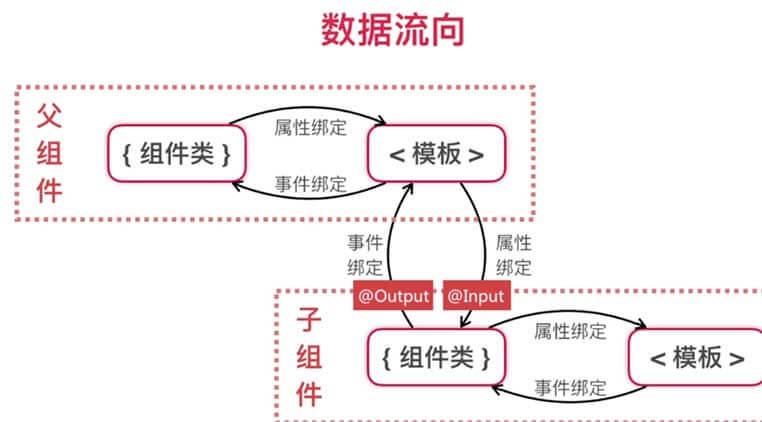
[prop]=\"value\"to pass data from a component class to its template (or to a child component input).
<input [message]="myData" />
- Event binding:
(event)=\"handler($event)\"to pass user interactions from the template back to the component class.
<input (keyup)="handle($event)" />
- Two-way binding:
[(ngModel)]for synchronized updates between template state and component state.
<input [(ngModel)]="myData" />
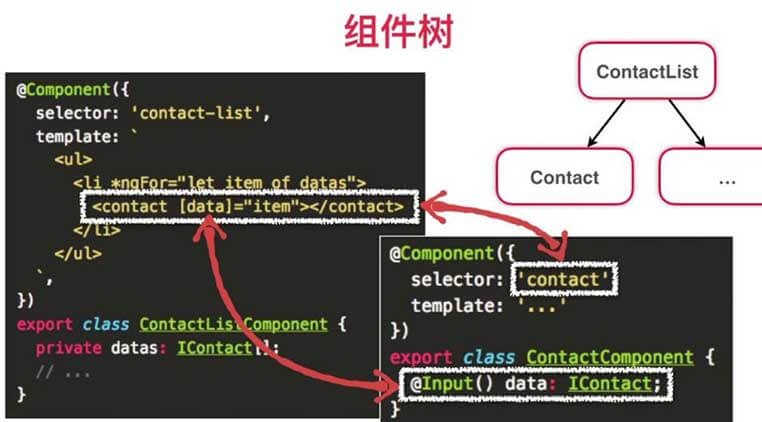
1.2 Component tree
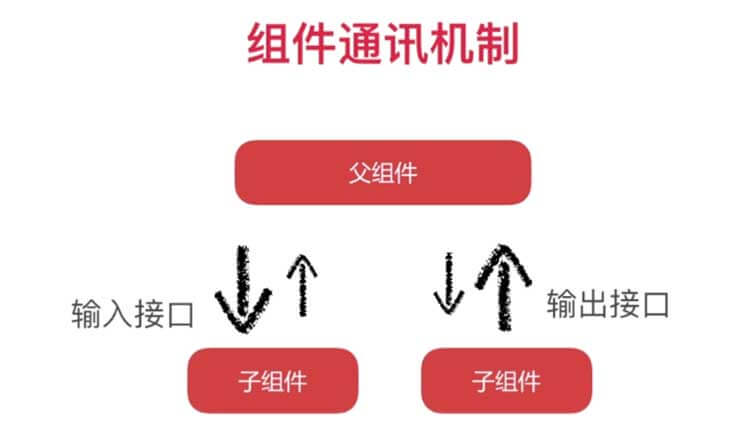
1.3 Component Communication and Data Flow
1.4 Component Lifecycle and Hooks
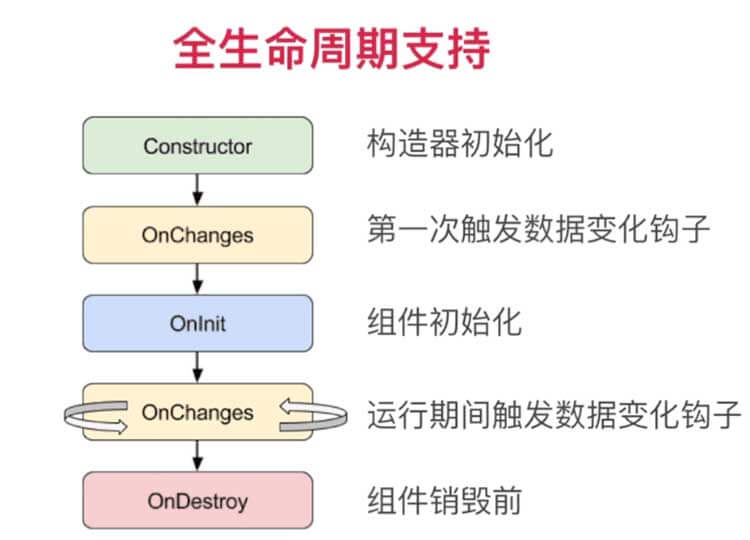
constructor: initialize fields and inject dependencies.OnChanges: runs when input properties change, including the first binding.OnInit: runs once after the firstOnChanges; good for startup logic.DoCheck/ change detection: runs during change detection cycles.OnDestroy: cleanup phase (unsubscribe, detach handlers, release resources).
2. Directives
A component is a directive with its own template.
2.1 Attribute Directives
Attribute directives change the appearance or behavior of existing elements (for example, styles).
2.2 Structural Directives
Structural directives change DOM layout, for example *ngIf inserts or removes nodes.
2.3 Custom Directives
// Custom directive highlight
// Import Directive, ElementRef, and Renderer to control element rendering.
import { Directive, ElementRef, Renderer } from '@angular/core';

@Directive({
    selector: "[highlight]" // Square brackets indicate that the directive is used on element attributes
})

export class HighlightDirective {
    constructor(private el: ElementRef, private renderer:Renderer) {
        renderer.setElementStyle(el.nativeElement, 'backgroundColor', 'pink');
    }
}
3. Services
A service is a class that encapsulates reusable business logic, such as logging.
export class LoggerService {
    constructor() {}

    debug(msg: string) {
        console.log(msg);
    }

    error(msg: string) {
        console.error(msg);
    }
}
4. Dependency Injection
4.1 Dependency Injection
Dependency injection (DI) is the mechanism Angular uses to provide dependencies (such as services) to components and other classes. In practice, Angular creates service instances and stores them in injectors so they can be reused.
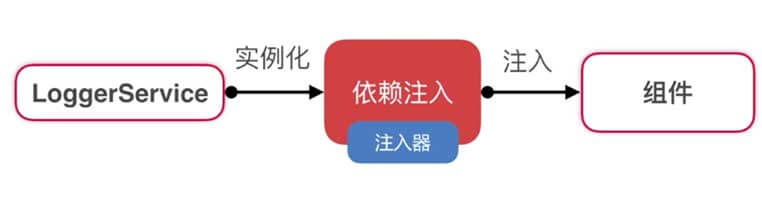
Example:
@Component({
    selector: 'hello',
    template: '<p>{{greeting}}</p>

    // Dependency injection configuration
    providers:[LoggerService]
})

export class HelloComponent {
    private greeting: string;

    // Constructor injection: Angular resolves LoggerService from the injector
    constructor(logger: LoggerService){
        this.greeting = 'Hello, Angular 2';
        logger.debug('Constructor complete');
    }
}
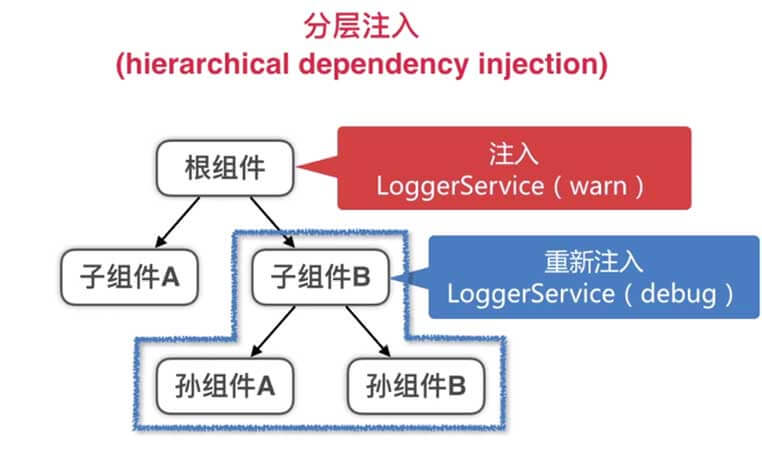
4.2 Hierarchical Dependency Injection
Services provided in a parent scope can be consumed by that component and its children.
5. Modules
5.1 File-Level Modules
- Common framework modules:
Core module: @angular/core
Common module: @angular/common
Form module: @angular/forms
Network module: @angular/http
Other modules
- Using modules:
Before using a framework module, import it explicitly:
import { Http } from "@angular/http";

import { Component } from "@angular/core";

import { Directive } from "@angular/core";

import { ElementRef, Renderer } from "@angular/core";
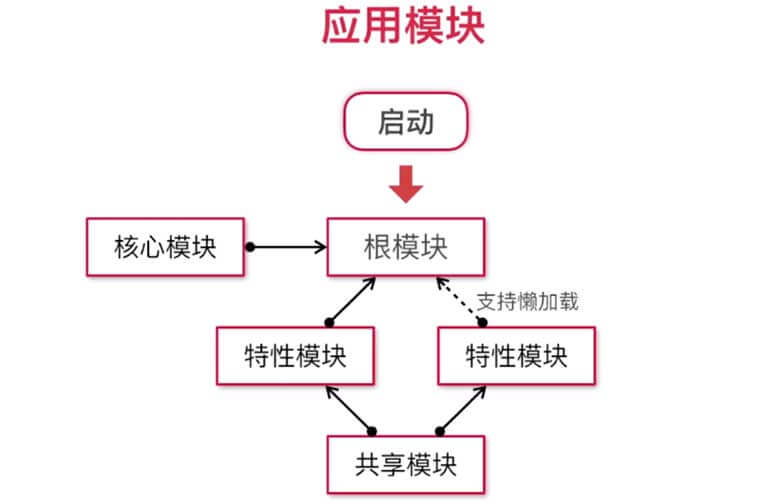
5.2 Application Modules
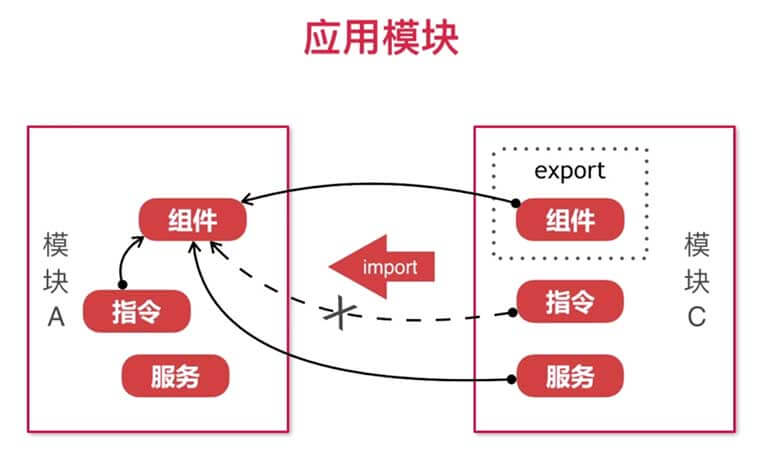
Group related components, services, and directives into feature modules by responsibility.
Module interaction:
By default, components can only use declarations that are visible in their module context. To use declarations from another module, import that module.
// @NgModule declares the module
@NgModule({

    // Wrap components or directives
    declarations: [
        AppComponent,
        HelloComponent,
        SomeDirective
    ],

    // Dependency injection service
    providers: [ LoggerService ],

    // Import other modules
    imports: [OtherModule ],

    // Set root component
    bootstrap: [ AppComponent],

    // Export the directives or modules exposed by this module for calls by other components
    exports:[ SomeDirective ]
})

export class AppModule {}
After importing another module, you can use its exported components/directives and services provided through DI.
- Root, feature, shared, and core modules
An Angular app is usually split by responsibility:
root moduleas the app entry pointfeature modulesfor domain-specific functionalityshared modulesfor reusable UI building blockscore modulesfor app-wide singleton services and infrastructure